A design review of a gearbox
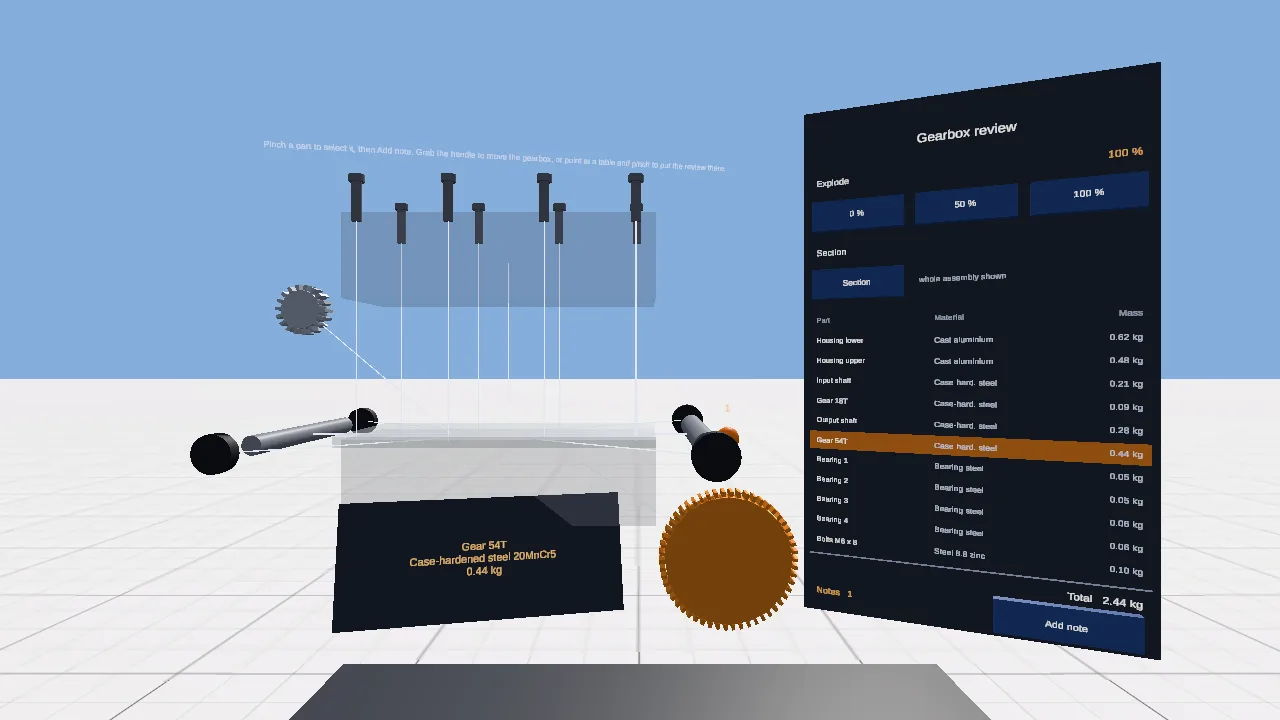
A gearbox at real size that comes apart: explode it, cut it open, select a part to read its material and mass, and pin notes to it.
- Design review
- Exploded view
- Parts list
See its pageA native app for the headset. Continuing from it needs Unity 6 on your computer.
The request, word for word
This is the text that was sent to the agent to start the project. Nothing was edited for this page.
Turn this into a design review of a small gearbox, the kind of review tool an engineering team would commission to look at a CAD assembly together at real size. Build the gearbox from simple shapes, about 40 cm long, floating above the table at chest height: a housing in two halves (lower and upper, slightly see-through grey), an input shaft with a small gear, an output shaft with a large gear meshing with it, four bearings (short dark cylinders) on the shaft ends, and eight bolts along the housing flange. The gears should look like gears: give each a ring of teeth. The two gears turn slowly, in opposite directions, at the right ratio for their sizes. Name every part in the hierarchy ("Housing upper", "Input shaft", "Gear 18T", "Gear 54T", "Bearing 1"...). Beside it, to the right, a review panel about 45 cm wide with: - an "Explode" control with three buttons (0 %, 50 %, 100 %): parts move apart along the assembly axes, the upper housing lifts, bolts rise above it, shafts and gears separate, each with a thin leader line back to where it belongs; - a "Section" toggle that hides the upper housing and the bolts so the inside is visible; - a list of the parts with their names and a material and mass for each (make up plausible values: cast aluminium, case-hardened steel, and so on) and a total mass at the bottom; - a "Notes" count. Pinching or pressing a part selects it: it is tinted orange, its row in the list is highlighted, and a small label with its name, material and mass floats beside it. Pressing "Add note" on the panel pins a numbered orange note marker on the selected part and increases the count. The whole gearbox can be grabbed and moved, and placed on a real surface by pinching on it, as the marker in the template was. So that it can be checked without a headset, add a small demo mode: when the scene starts in the Editor it sets the explode to 100 %, selects "Gear 54T" and adds one note to it, then stays like that. On a device this is off. All text must be large enough to read from 1.2 m. Title label: "Gearbox review".
How it went
- Runs
- One run: the request above, and it was done. A run ends only when the project builds and loads in a real browser without errors.
- Started from
- The Unity for Android XR template: A native Unity project for Android XR headsets and glasses (Samsung Galaxy XR, XREAL Project Aura and others): passthrough, real surfaces, hands and gaze, built as an Android app you install on the device.
- Notes and credits
- Materials and masses are made up. AI: Claude Code.
Build your own
Graspable is a desktop app. Describe the scene you want, and the agent builds it as a real project on your computer and checks that it runs. It is free with your own AI account.
More examples
 React XR template
A tape measure in a real room
Point at any surface, pull the trigger, and read the distance on a steel tape.
- Real-room scan
- Controllers
- PBR materials
Read the request that made it (3 runs)
 XR Game template
Arcade basketball
Grab a ball off the rack, swing, let go: it bounces off the backboard, rattles the rim and the scoreboard counts.
- Controllers
- Physics
- Game
- Sound
Read the request that made it (one run)