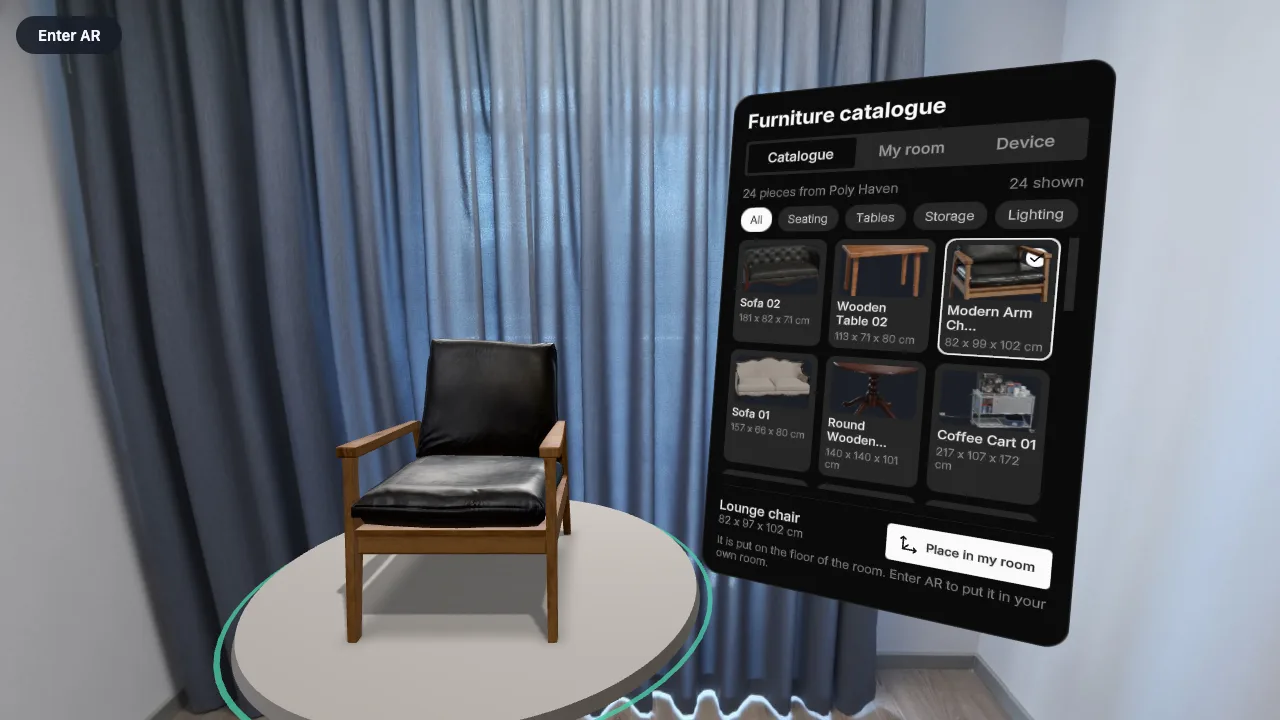
A furniture catalogue from the internet, in your room
The catalogue is loaded live: pick a scanned piece from the list, see it at its true size, and place several in your own room.
- Loads from the internet
- Mixed reality
- uikit
- Photoreal models
Open the appContinue from it in GraspableRuns in a browser, on a Quest or a Vision Pro.
The request, word for word
This is the text that was sent to the agent to start the project. Nothing was edited for this page.
Turn this into a furniture catalogue that people place in their own room, the kind of app a furniture retailer would commission. The catalogue is not in the app: it is loaded from the internet when the app starts. The source is Poly Haven's public catalogue of scanned, photoreal models (public domain, CC0, open to browsers): - the list: https://api.polyhaven.com/assets?t=models&c=furniture gives every furniture model with its name, categories, real dimensions in millimetres and polycount; - one model's files: https://api.polyhaven.com/files/<id> ; use the glTF at 1k (gltf → 1k → gltf: its url, and the files under include, which the glTF refers to by relative path, so loading the url is enough); - thumbnails: https://cdn.polyhaven.com/asset_img/thumbs/<id>.png?width=256 Keep only models under 60,000 polygons and no larger than 2.5 m in any direction, and show the 24 most downloaded. The panel has two tabs. Catalogue: a scrolling grid of cards, each with the thumbnail, the name and the real size in centimetres (width x depth x height). A row of filter chips above it: All, Seating, Tables, Storage, Lighting (from the categories). Choosing a card loads that model from the internet (show a progress state on the card, and "Could not load" if it fails) and puts it on the stand, replacing what was there. My room: the pieces I have placed, each with its name and size and a remove button, the number of pieces, and the floor area they take together in square metres. "Place in my room" places the current piece where I point, on the real floor in AR, at its real size, and it stays there; I can place several pieces, drag any of them later, and turn the selected one with the slider. In VR and on a flat screen they are placed on the floor of the photographed room. Every model must appear at its true size: check the loaded model's bounding box against the catalogue's dimensions and correct the scale when a file is not in metres (some are ten times too large). Stand each piece on its base. While the list is loading show skeleton cards; with no connection show "No connection" and the lounge chair that ships with the app, so the app is never empty. Nothing may throw when the network is away. Keep the Device tab as it is. Title of the panel: "Furniture catalogue".
How it went
- Runs
- One run: the request above, and it was done. A run ends only when the project builds and loads in a real browser without errors.
- Started from
- The Cross-platform XR template: One app for every headset, pair of glasses, phone and computer: a product shown in your own room where the device has passthrough, in a photographed room where it does not.
- Notes and credits
- Models, thumbnails and sizes are loaded at run time from Poly Haven's public catalogue (CC0). AI: Claude Code.
Build your own
Graspable is a desktop app. Describe the scene you want, and the agent builds it as a real project on your computer and checks that it runs. It is free with your own AI account.
More examples
 Unity for Quest template
A guided shutdown of a pump unit
A five-step maintenance procedure in mixed reality: the step card says what to do, the part to act on glows, and the unit answers.
- Work instructions
- Mixed reality
- Hands and controllers
Read the request that made it (2 runs)
 React XR template
A tape measure in a real room
Point at any surface, pull the trigger, and read the distance on a steel tape.
- Real-room scan
- Controllers
- PBR materials
Read the request that made it (3 runs)