A guided shutdown of a pump unit
A five-step maintenance procedure in mixed reality: the step card says what to do, the part to act on glows, and the unit answers.
- Work instructions
- Mixed reality
- Hands and controllers
See its pageContinue from it in GraspableA native app for the headset. Continuing from it needs Unity 6 on your computer.
The request, word for word
This is the text that was sent to the agent to start the project. Nothing was edited for this page.
Turn this into a guided maintenance procedure in mixed reality: shutting down a pump unit, the kind of digital work instruction a factory would commission. Build the pump unit from simple shapes, about 60 cm wide, standing on the table: a grey base plate, a blue motor (a cylinder on its side) with a coupling, a pump housing, an inlet pipe and an outlet pipe, two red valve handwheels named "Valve A" (inlet) and "Valve B" (outlet), a round pressure gauge with a needle, and a power switch box with a green lamp. Name every part in the scene so the names are readable in the hierarchy. Beside it, a step card (a panel about 40 cm wide at eye height, to the left of the unit) that shows one step at a time, the step number out of 5, and a progress bar: 1. Switch off the motor (press the switch; the lamp goes from green to red and the motor stops turning). 2. Close Valve A (grab or press the handwheel; it turns a quarter turn and its pipe turns from blue to grey). 3. Close Valve B (same). 4. Wait for the pressure to drop (the gauge needle falls from 6 bar to 0 over three seconds by itself). 5. Hang the lock-out tag (press the tag hanging beside the switch; it moves onto the switch). The part of the current step pulses with a yellow outline or glow so I know where to act. Doing a step out of order shows "Not yet: do step N first" on the card for two seconds and counts as an error. When all five are done the card shows "Procedure complete", the time taken and the number of errors, and a "Start again" button that resets everything. Keep the "place a marker on a real surface" behaviour but use it for the unit: pinching on a real surface moves the whole pump unit there, anchored. On a flat screen without a room it simply stays on the table. So that it can be checked without a headset, add a small demo mode: when the scene starts in the Editor, it performs the five steps by itself, one every 1.5 seconds, and stops on the completed card. On a device this is off. All text must be large enough to read from 1.5 m. Keep the title label short: "Pump shutdown".
How it went
- Runs
- 2 runs: the request above, then one follow-up request. A run ends only when the project builds and loads in a real browser without errors.
- Started from
- The Unity for Quest template: A native Unity project for Meta Quest and Meta VR Glasses: mixed reality out of the box, with passthrough, real surfaces, hands, gaze and controllers, built as an Android app you install on the headset.
- Notes and credits
- One follow-up request raised the unit into view, strengthened the highlight and added the part labels. The loop is six moments of the project's own demo mode in play mode. AI: Claude Code.
Build your own
Graspable is a desktop app. Describe the scene you want, and the agent builds it as a real project on your computer and checks that it runs. It is free with your own AI account.
More examples
 Cross-platform XR template
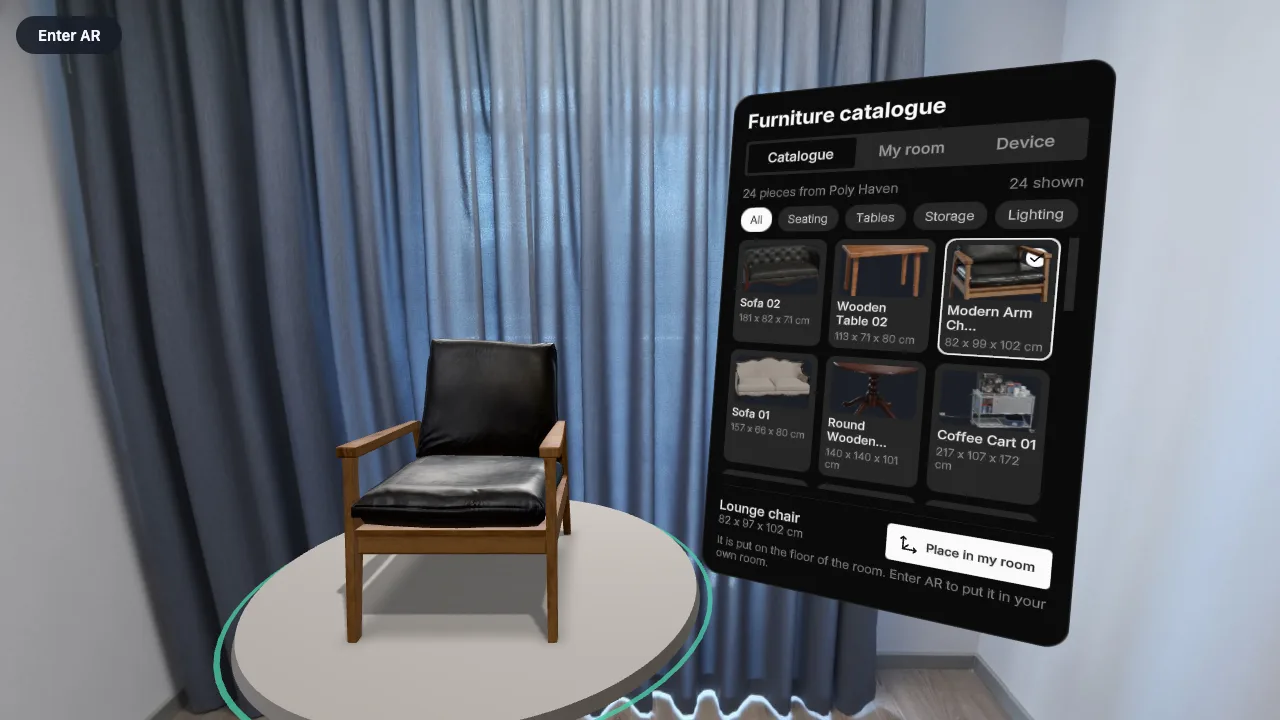
A furniture catalogue from the internet, in your room
The catalogue is loaded live: pick a scanned piece from the list, see it at its true size, and place several in your own room.
- Loads from the internet
- Mixed reality
- uikit
- Photoreal models
Read the request that made it (one run)
 React XR template
A tape measure in a real room
Point at any surface, pull the trigger, and read the distance on a steel tape.
- Real-room scan
- Controllers
- PBR materials
Read the request that made it (3 runs)