A chair configurator in a headset, from one request
A shell chair in a dark showroom: point at a swatch, pull the trigger, and the chair and its price change. It was built in one run, and the request is here word for word.
Michal Takáč 3 min read
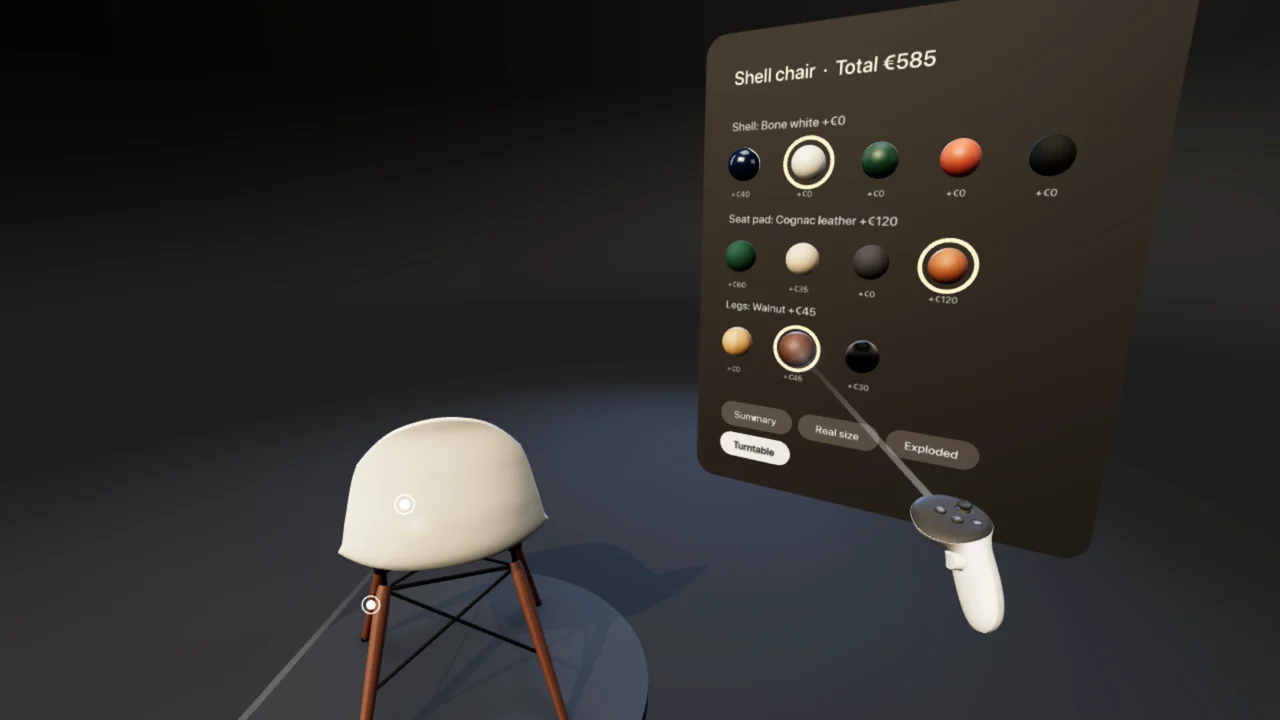
A shell chair stands on a turntable in a dark showroom, with an options panel beside it. Point at a swatch and pull the trigger: shell colour, seat pad and legs change on the chair, the price adds up, and a summary lists the choice.
What it shows
- Controllers. You choose by pointing at a swatch and pulling the trigger.
- A product configurator. Shell colour, seat pad and legs change on the chair, and the price adds up.
- PBR materials. The request asks for gloss paint, velvet, leather and brushed steel that look like what they are.
- Spatial labels. The panel beside the chair lists the swatches with their prices and the total.
In the picture at the top the chair has a bone white shell, a cognac leather seat pad and walnut legs, and the panel shows a total of 585 euros. With the price list of the request that is the base chair at 420, the shell at 0, the leather at 120 and the walnut at 45.
How it was made
The project started from the Product Studio template: one product in a photo studio, with colours and materials people can choose, placed at real size in VR or in their own room.
It took one run. One request, no follow-ups. The AI was the Graspable agent. A run ends only when the project builds and loads in a real browser without errors.
The request, word for word
This is the text that was sent to the agent to start the project. Nothing was edited for this article.
Make this a proper configurator for the chair, in a dark showroom.
The showroom: charcoal backdrop that curves into the floor, one warm key light from the upper left, a cool rim light from behind, a soft shadow under the chair, and a slow sweep of light across the chair whenever I change an option.
Options: shell in five colours (deep navy gloss, bone white, forest green, terracotta, matt black), seat pad in four fabrics (forest green velvet, oatmeal wool, charcoal weave, cognac leather), legs in three finishes (oak, walnut, black steel). Navy gloss shell with the forest green velvet pad and oak legs is the default. The materials must look like what they are: gloss paint with a clear reflection, velvet with a soft sheen, leather with a fine grain, brushed steel.
Every choice has a price. Use: base chair 420; shell colours +0 except gloss navy +40; velvet +60, wool +35, weave +0, leather +120; oak +0, walnut +45, steel +30. Show the running total in euros at the top of the panel in the headset and on the options card, and show each price next to its choice. Add a Summary button that opens a plate listing the chosen shell, pad and legs with their prices and the total, and closes again.
In the headset the panel stands to the right of the chair, angled towards me, with colour swatches I can point at and pick with the trigger; the chosen one has a clear ring. Text must be crisp and readable from two metres. Keep the exploded view, the callouts and the real-size mode working.
Notes and credits
The picture and the film are captures of the project running in Graspable's emulated headset.
Make your own
Graspable is a desktop app. Describe the scene you want, and the agent builds it as a real project on your computer and checks that it runs.
Download Graspable, and start from the Product Studio template to show a product of your own. More examples are in Made in Graspable.