A shelving configurator for Apple Vision Pro, from one request
Choose width, height, finish and extras in a window, read the parts and the price, and see the shelf at real size in your room. A native app built in one run; the request is here word for word.
Michal Takáč 4 min read
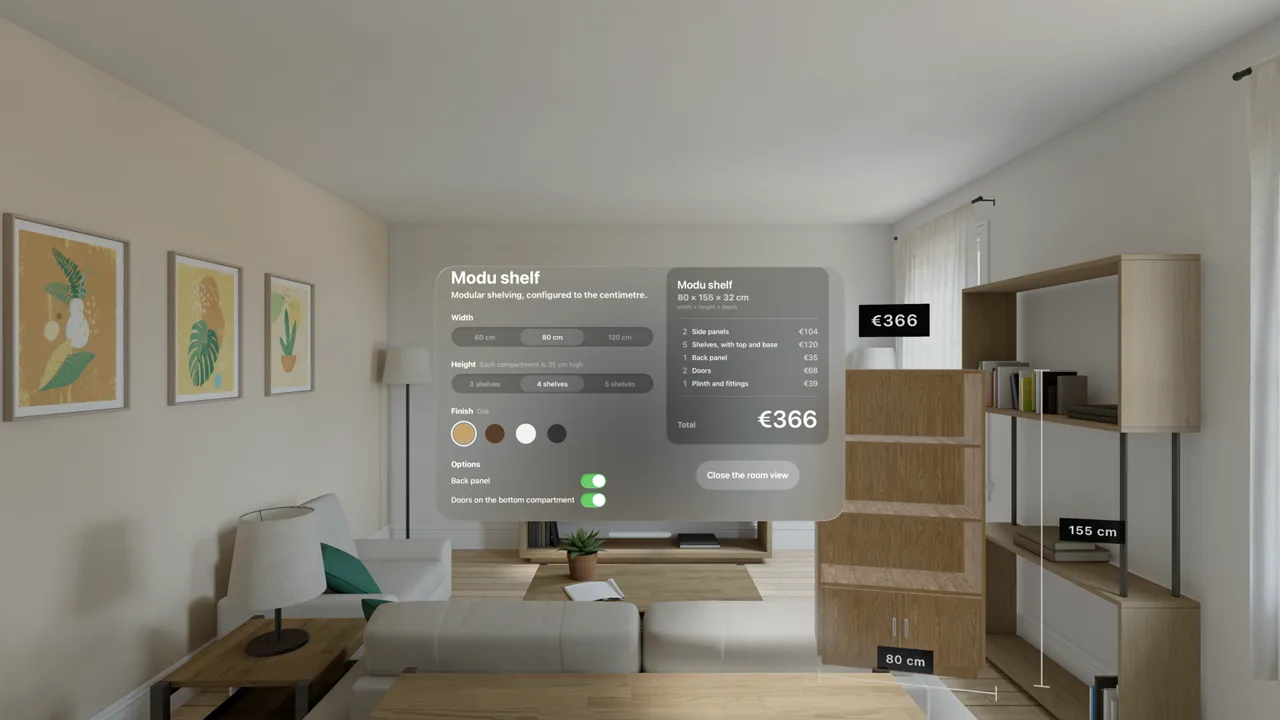
This is a product configurator for a modular shelf. Choose width, height, finish and extras in a window, read the parts and the price, and see the shelf at real size in your room.
It is a native app for Apple Vision Pro, so it does not run in a browser. Its app page shows the picture of it.
What it shows
- A product configurator. You choose width, height, finish and extras, and read the parts and the price.
- Window and space. You choose in a window and see the result standing in the room.
- Real materials. The oak is a photographed wood.
The picture at the top is from the visionOS Simulator's living room. The window is titled Modu shelf: width, height, finish swatches and options on the left, a parts list and a total of 366 euros on the right. Beside the window stands an oak shelf with four compartments, doors with steel handles and a plinth, with a price tag and labels reading 155 cm and 80 cm.
How it was made
The project started from the Apple Vision Pro template: a native app with a window of controls and an immersive space around the person, built and run in the visionOS Simulator by your own Xcode.
It took one run. The AI was Claude Code.
The request, word for word
This is the text that was sent to the agent to start the project. Nothing was edited for this article.
Turn this into a product configurator for modular shelving, the kind of app a furniture or retail company would commission for Apple Vision Pro: choose in a window, then see the result at real size in your own room.
The product is a modular shelf built from RealityKit boxes: side panels, shelves and an optional back panel and optional doors on the lowest compartment. Real dimensions in metres.
The window (make it wider, about 900 by 560 points) has two halves.
Left: the options.
- Width: 60, 80 or 120 cm (segmented).
- Height: 3, 4 or 5 shelves (each compartment is 35 cm high).
- Finish: Oak, Walnut, White, Graphite (colour swatches as round buttons; pick colours that look like those finishes).
- Back panel: on or off. Doors on the bottom compartment: on or off.
Right: a summary card with the name ("Modu shelf"), the overall size in cm (width x height x depth, depth is 32 cm), the list of parts with counts (side panels, shelves, back panel, doors), and the price, which changes with the options: make up a simple, sensible price list and show the total large. Below it a prominent button "View in my room" that opens the space, and becomes "Close the room view" while it is open.
The space: the shelf stands on the floor 2.8 m in front of me and 1.1 m to the right of the window, turned a little toward me, so the whole shelf from the floor to its top is in view beside the window. It is built from the options and rebuilt at once when I change any of them, and can be dragged along the floor by pinching. Next to it float two dimension labels (width and height) with clear lines, and a price tag above it, all large enough to read from where I stand, on dark rounded backgrounds.
Make it look like real furniture. Use the kit: Oak and Walnut are the photographed woods (Kit.material and Kit.box, with the grain running along each board), White is a smooth lacquer and Graphite a dark matt lacquer (Kit.plain). Boards are 18 mm thick with slightly rounded edges; shelves sit between the side panels; the back panel is thin; the doors have small brushed-steel handles and a narrow gap between them; the shelf stands on a low plinth.
Keep the model in one observable class, with the price list and the part counts computed there, so the window and the space always agree. Keep the launch behaviour that opens the space when GRASPABLE_OPEN_SPACE is set.
Start with: 80 cm, 4 shelves, Oak, back panel on, doors on.
Notes and credits
Prices and the product are made up.
The wood is a photographed oak from Poly Haven (CC0).
The picture is a capture of the app in the visionOS Simulator.
Make your own
Graspable is a desktop app. Describe the scene you want, and the agent builds it as a real project on your computer and checks that it runs. For a Vision Pro app you need a Mac with Xcode.
Download Graspable, and start from the Apple Vision Pro template. More examples are in Made in Graspable.